
You bought a smart switch, took the old one off the wall, and found two wires where the instructions show three. It is the most common problem in smart lighting, and the most common reason a smart switch goes back in its box. The good news: having no neutral wire at the switch does not mean you cannot have smart lights. It means you need to pick the right solution.
The short answer: most Wi-Fi smart switches need a neutral wire at the switch box. If your box has no neutral wire, you have four options that work: a switch designed for no neutral, a smart module at the light instead of the switch, a new neutral pulled to the box, or a wireless wall switch. The right one depends on your lights, your walls and how much work you want to do. This guide, written from years of installing smart switches in Lebanese homes, villas and hotels, shows you how to choose.
What a neutral wire is, and why smart switches need one
An ordinary light switch is just a gap in the live wire. Flip it on and the gap closes, current flows to the bulb and back through the neutral. The switch itself never needs power.
A smart switch is different. Its Wi-Fi or Zigbee radio, its touch panel and its LED indicators have to stay powered all the time, even when the light is off, so it can listen for your phone, a schedule or a voice command. To be powered all the time it needs a complete circuit of its own: the live wire in, and a neutral wire back. That is the third wire.
The neutral also gives the electronics a stable reference. Lutron, one of the oldest lighting control manufacturers, explains that a neutral gives a dimmer a reference point and a separate path for its own electronics, which is why neutral-based designs are far less likely to flicker, glow faintly or fail to switch fully off with LED lights (Lutron, “Why do I Need a Neutral Based Dimmer”).
Why so many switch boxes have no neutral wire
It is not a fault, it is how many homes were wired. In a very common layout, the electrician brings the live, neutral and earth to the ceiling light first. Then a single cable drops down to the switch carrying the live and the “switched live” back up. The neutral connects at the light and never comes down the wall. This is called a switch loop, and it works perfectly for an ordinary switch, which never needed a neutral.
In Lebanon we find switch loops in a large share of buildings, especially older apartments and houses rewired in stages over the years. Newer installations and villas wired by careful electricians usually do bring a neutral to every switch box. In practice you will not know until you open the box, and the answer can differ from room to room in the same home.
The key consequence: in a switch-loop home there is almost always a neutral at the ceiling light, just not at the switch. Remember that, because it opens one of the best options below. The switch box itself simply has no neutral to connect it to.
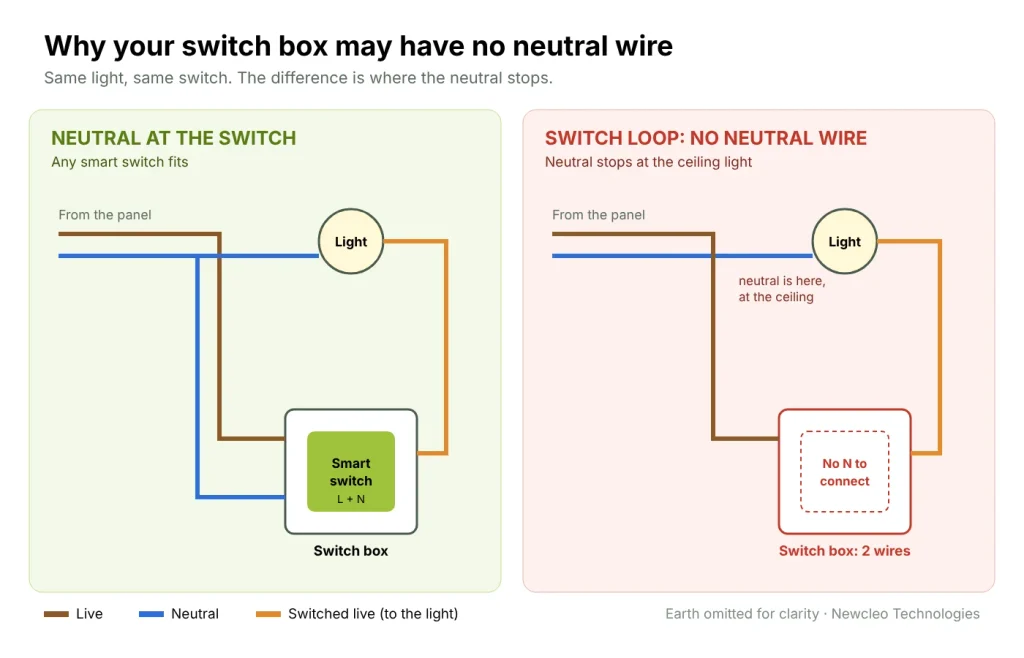
How to check your switch box in 60 seconds
- Switch off the circuit at the breaker, then confirm the light no longer turns on. If you are not comfortable working near mains wiring, stop here and ask an electrician. It takes them two minutes.
- Unscrew the switch plate and pull the switch gently forward without disconnecting anything.
- Count the wires and look at the colours. Under the international colour code, brown is live, blue is neutral and green-yellow is earth. Two wires on the switch with no blue wire in the box usually means a switch loop with no neutral wire. A bundle of blue wires joined together at the back of the box usually means a neutral is there, simply unused by the old switch.
- Do not trust colours alone. In many older buildings colours were used loosely, and a blue wire can be a live. If you see a possible neutral, have an electrician confirm it with a tester before you rely on it.
Your four options when there is no neutral wire
1. Use a smart switch designed for no neutral wire
Some smart switches and modules are built to power themselves by letting a tiny current trickle through the light even when it is off. The SONOFF ZBMINI-L2, for example, is designed to work without a neutral wire and with light loads from 3W, up to 6A, using Zigbee (SONOFF, ZBMINI-L2).
The trade-offs are worth knowing before you buy:
- They usually need a hub. Most no-neutral models use Zigbee rather than Wi-Fi, because Zigbee radios use far less power. That means a Zigbee hub in the home. (If you are weighing Zigbee against Wi-Fi more generally, see our guide to smart home protocols.)
- LED lights can misbehave. The trickle current that powers the switch passes through the bulb. With some LED drivers that causes a faint glow when off, flickering, or a light that never fully switches off.
- Minimum load matters. A single low-wattage LED may not draw enough for the switch to work reliably. Check the minimum load before you buy.
2. Put the smart module at the light, not the switch
This is often the cleanest fix in a switch-loop home, and the one we use most. Because the neutral is already at the ceiling, a small in-line smart module such as the SONOFF MINI R2 can be fitted at the light fitting, where it gets the live and neutral it needs. An electrician can keep your existing wall switch working as the manual control, connected to the module, so the light works from the wall, the app, schedules and voice.
The limits: there must be room at the fitting or in the ceiling for the module, and someone has to reach it. For chandeliers and false ceilings this is usually easy. For flush plaster ceilings with no access it may not be.
3. Bring a neutral wire to the switch box
This is the best long-term result. With a neutral at the box you can fit any smart switch, including Wi-Fi touch switches that need no hub, and you avoid every LED side effect above. If the cables run through conduit, pulling an extra neutral can be a short job. If they are buried directly in the wall, it means chasing plaster, which is why this option makes most sense during a renovation or a new build. If you are renovating, ask for a neutral at every switch box. It costs very little at that stage and keeps every option open for the next twenty years.
4. Use a wireless wall switch
Instead of wiring the switch, you can put the smart relay at the light and stick or screw a battery-powered or RF wireless panel on the wall where the old switch was. It is the least disruptive option and is useful where you want an extra switch somewhere no cable runs, like beside a bed. The downside is a battery to change on some models, and a blanked-off old switch box to tidy up.
Which option is right for you
| Your situation | Best option | Why |
|---|---|---|
| Neutral wire present at the box | Any smart switch, including Wi-Fi touch switches | No hub needed, no flicker, widest choice |
| No neutral, accessible ceiling or fitting | Smart module at the light (option 2) | Uses the neutral already at the ceiling, keeps your wall switch |
| No neutral, renovating or conduit in the wall | Bring a neutral to the box (option 3) | Best result for the lowest extra cost at this stage |
| No neutral, no ceiling access, Zigbee hub at home | No-neutral smart switch (option 1) | Works in the existing box, but check LED behaviour and minimum load |
| Want a switch where no cable runs | Wireless wall switch (option 4) | No wiring in the wall at all |
How to avoid LED flicker and ghosting
Most complaints about smart switches are really complaints about the bulbs. A few rules prevent nearly all of them:
- Use a neutral wherever you can. It removes the trickle current through the bulb, which is the root cause of glowing and flickering with no-neutral switches.
- Buy quality LEDs. Cheap LED drivers are the most sensitive to leakage current. For dimmers, choose lamps marked dimmable and, ideally, compliant with NEMA SSL 7A, the standard for dimmer and LED compatibility.
- Respect the minimum load. If one small LED is below the switch’s minimum, the circuit may misbehave. More bulbs on the same circuit, or a higher wattage, often fixes it.
- Follow the manufacturer on accessories. Some no-neutral switches are designed to work without anti-flicker capacitors, and SONOFF warns that adding one to the ZBMINI-L2 is unnecessary and may damage it. Others recommend one. Read the manual for your exact model.
The one thing you must never do
Never use the earth wire as a neutral. It can make a smart switch appear to work, which is why people try it. But it puts current onto the earth conductor, which exists only to protect people from electric shock, and it can make metal parts of the installation live. It is unsafe and against wiring rules everywhere. If there is no neutral, use one of the four options above.
What we supply, and how we install
Everything in our smart switches range is designed to be installed with a neutral wire:
- Our Wi-Fi touch switches, such as the 1 gang Wi-Fi touch switch, need a neutral at the back box because the Wi-Fi radio is powered at all times. In return they need no hub.
- Our RF touch dimmers connect to live, load and neutral.
- Our in-line SONOFF modules are the answer for switch-loop rooms: fitted at the light, where the neutral already is (option 2).
Before any switch is ordered, we check each box and pick the right option room by room, so nothing goes back in its packaging. If you are not sure what is behind your switches, send us a photo of an open box on WhatsApp and we will tell you which option fits. Or see our full smart home installation services.
Frequently asked questions
Can I install a smart switch without a neutral wire?
Yes, with a switch designed for no neutral wire, usually Zigbee with a hub. Expect possible LED flicker or glow and check the minimum load. A module at the light fitting is often a better alternative.
How do I know if I have a neutral wire?
Switch off the breaker, open the switch box and look for a blue wire or a bundle of blue wires joined at the back. Two wires on the switch and no blue usually means no neutral. Have an electrician confirm before you rely on any wire.
Why does my LED glow faintly when the smart switch is off?
A no-neutral switch powers itself by passing a tiny current through the bulb. Some LED drivers light up on that current. A neutral connection, better quality LEDs or a higher total load usually fixes it.
Do Wi-Fi smart switches always need a neutral?
Almost always. Wi-Fi radios draw too much power to run on the trickle current a no-neutral design provides, which is why no-neutral switches are mostly Zigbee.
What happens to my smart switches during a power cut?
They switch off with everything else. When power returns, most models let you choose in the app whether lights come back on, stay off or return to their last state. Set this once, so lights do not all turn on in an empty house after a cut.
Can I use the earth wire instead of a neutral?
No. It is unsafe and against wiring rules. Use one of the four options in this guide.
Not sure what is behind your switches? Ask Newcleo Technologies and we will tell you which option fits your home, room by room.