


Description
The sonoff basic R2 is the most economical way to put a circuit under app control. It wires in line between the supply and the load, and from that point the light, pump, fan or heater it controls can be switched from a phone anywhere, put on a schedule, or operated by voice.
What the sonoff basic is good for
It is a wire-in module rather than a plug adapter, which makes it suitable for things that have no plug: ceiling lights, extractor fans, pumps, gate motors, outdoor lighting. Up to eight scheduled tasks can be set per device, which covers the common cases of outdoor lights on at dusk, a pump running at a fixed hour, or a heater warming a room before anyone gets home. It reports state back to the app, so you can confirm what is on from elsewhere.
Key features
- Remote on and off from anywhere through eWeLink
- Up to 8 scheduled tasks per device
- Status monitoring and reporting
- Alexa and Google Assistant compatible
- Multiple devices managed from one phone
- Compact in-line housing
- 10A, 2200W maximum
Setup and network requirements
Download eWeLink, cut the power, wire the module in, then power up. It enters pairing mode on first use. The radio is 2.4 GHz only, the band covered by ETSI EN 300 328, so a dual-band router may need its SSIDs split during setup. Control depends on the vendor cloud, so an internet outage removes app and voice control until the connection returns. If you want automation that keeps working without internet, the RF433 range is the better answer, and smart home protocols explains the trade-off in full.
Specifications
| Model | BASIC R2 |
| Voltage range | AC 100 to 220V, 50/60 Hz |
| Maximum current | 10A |
| Maximum power | 2200W |
| Wi-Fi | 2.4 GHz |
| Dimensions | 88 x 39 x 24 mm |
| Operating temperature | 0 to 40 degrees C |
| Humidity | 5 to 90 percent RH, non-condensing |
| App | eWeLink |
Safety
This module is wired into a live circuit and is not a plug-in adapter. Isolate at the breaker before installation, keep it out of humid locations, and do not exceed 10A. Installation by a qualified electrician is recommended.
Frequently asked questions
What is the difference from the Sonoff Mini?
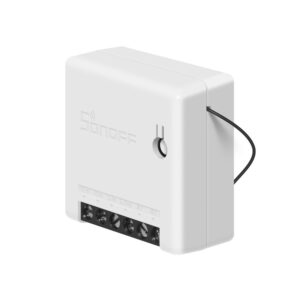
The Mini is smaller and designed to sit behind an existing switch while keeping that switch working. The Basic is a plain in-line module, and cheaper.
Does it work without internet?
The circuit keeps its last state, but app and voice control need the connection.
Can I use it outdoors?
Only inside a suitable weatherproof enclosure. The module itself is not rated for outdoor exposure.
Where the sonoff basic fits in a property
It is the module we use for the jobs nobody sees: outdoor lighting on a dusk schedule, a water pump on a timer, an extractor that should run for ten minutes after the light goes off, a gate motor triggered from a phone. Because it wires in line rather than plugging in, it works with anything on a fixed circuit inside its rating.
Enclosure and placement
The sonoff basic has no ingress protection of its own, so it needs a suitable enclosure wherever it is exposed to damp, dust or weather. Outdoors this means a proper weatherproof box, not a plastic bag, and in a plant room it should be mounted clear of pipework that can sweat. Wi-Fi coverage is worth checking before installation rather than after: a module buried in a metal consumer unit or behind a concrete wall may pair on the bench and then fail in position. If coverage is marginal, our RF433 range is a better fit than adding another access point.
Browse all smart switches and modules.

Reviews
There are no reviews yet.